
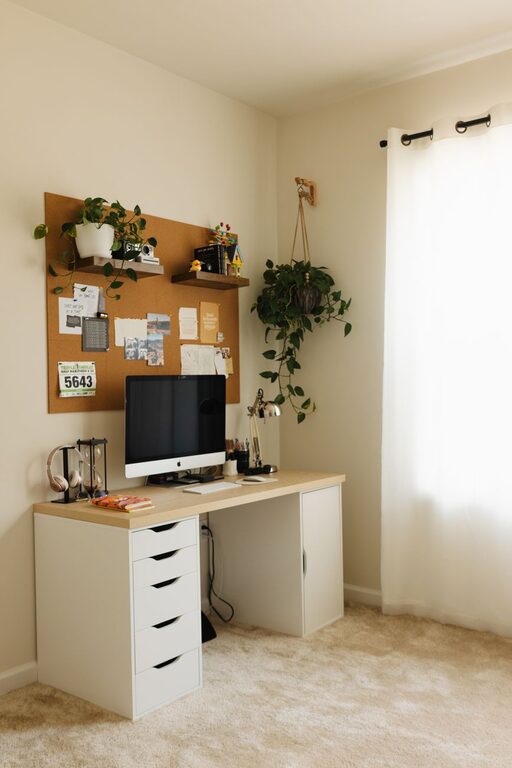
Creating a cozy and functional home workspace is essential for staying productive and comfortable throughout your workday. Whether you’re working remotely full-time or occasionally need a quiet spot for tasks, your workspace should inspire focus while providing comfort. Here are practical tips to help you set up a home office that works for you.
Choose the Right Location
Selecting a suitable location for your workspace is the first step. You want a spot that minimizes distractions and lets you focus.
– Pick a quiet corner: Avoid high-traffic areas and places near noisy appliances.
– Natural light is a bonus: If possible, choose a spot near a window. Natural light can boost your mood and reduce eye strain.
– Consider privacy: If you live with others, find a place where you can close a door or set up a room divider.
Invest in Ergonomic Furniture
Your comfort directly affects how well you work. Ergonomic furniture supports your body and reduces strain.
– Desk: Choose a desk with enough surface area for your essentials without feeling cramped.
– Chair: Invest in an adjustable chair with good lumbar support to maintain proper posture.
– Monitor height: Position your monitor so the top of the screen is at eye level, which helps prevent neck strain.
Organize Your Workspace Efficiently
Clutter can be distracting and reduce productivity. Creating an organized space helps you stay on task and reduces stress.
– Use storage solutions: Drawers, shelves, or storage bins keep supplies and paperwork tidy.
– Declutter regularly: Set aside time weekly to clear out unnecessary items.
– Keep essentials handy: Store frequently used items within arm’s reach for convenience.
Enhance Lighting
Good lighting is crucial for comfort and focus.
– Layer your lighting: Combine natural light with task lighting such as desk lamps.
– Avoid glare: Position lights and computer screens to reduce reflections.
– Choose warm bulbs: Warm or soft white bulbs create a cozy atmosphere without being harsh.
Personalize Your Space
Personal touches make your workspace inviting and inspiring.
– Add plants: Indoor plants improve air quality and add a calming presence.
– Decorate with meaningful items: Photos, artwork, or mementos can boost your mood.
– Choose soothing colors: Soft, neutral tones create a relaxing backdrop that won’t distract you.
Manage Cable Clutter
Cables can quickly make a workspace look messy.
– Use cable organizers: Clips, sleeves, or boxes keep cords untangled.
– Wireless options: Where possible, use wireless keyboards, mice, and printers.
– Label cables: If you must deal with many cords, labeling helps you identify them quickly.
Incorporate Comfortable Break Zones
Taking breaks is vital, and having a spot to relax within your workspace helps maintain balance.
– Add a cozy chair or cushion: A small seating area lets you step away from your desk.
– Use a small table: For coffee or notebooks to encourage short pauses.
– Keep it inviting: Soft throws or pillows make the area feel like a retreat.
Prioritize Acoustics
Noise can disrupt your concentration. Improve your workspace’s acoustics to maintain a quiet environment.
– Use rugs or curtains: These absorb sound and reduce echo.
– White noise machines or apps: These can mask distracting noises.
– Noise-cancelling headphones: Ideal if complete silence is not possible.
Maintain Good Air Quality
Fresh air helps you feel more alert.
– Open windows when possible: Circulate fresh air to reduce stuffiness.
– Use an air purifier: Helpful in spaces with limited ventilation.
– Keep plants: Some indoor plants also purify the air naturally.
Plan for Tech Needs
Ensuring your technology is set up efficiently keeps you productive.
– Reliable internet connection: Essential for remote work and video calls.
– Power outlets: Have enough outlets near your desk for all devices.
– Backup solutions: Use external drives or cloud storage to protect your work.
Conclusion
Designing a cozy and functional home workspace doesn’t have to be complicated. By focusing on location, ergonomics, organization, lighting, and personalization, you can create an environment that supports both comfort and productivity. Small touches like plants, smooth cable management, and dedicated break zones make a big difference in your daily work experience. Take the time to tailor your space to your needs, and you’ll enjoy working from home more than ever.